Free app · November 10, 2026 · Reads public pages only
More of your customers now ask ChatGPT, Claude, or Google's AI where to taste, where to buy, and who carries what. Those assistants can only recommend you if they can get into your website and read it. Type in your address and see how ready yours is in about ten seconds. For wineries, breweries, distilleries, and shops.
- Public pages only. It reads what anyone on the internet can see. No access to your site's back end.
- Never put into Claude or any AI. The checks are plain code with fixed rules. No AI model reads your site or your result.
- Your score is saved to your account. The address, score, and level, so you can compare next time. Delete it any time.
What you get
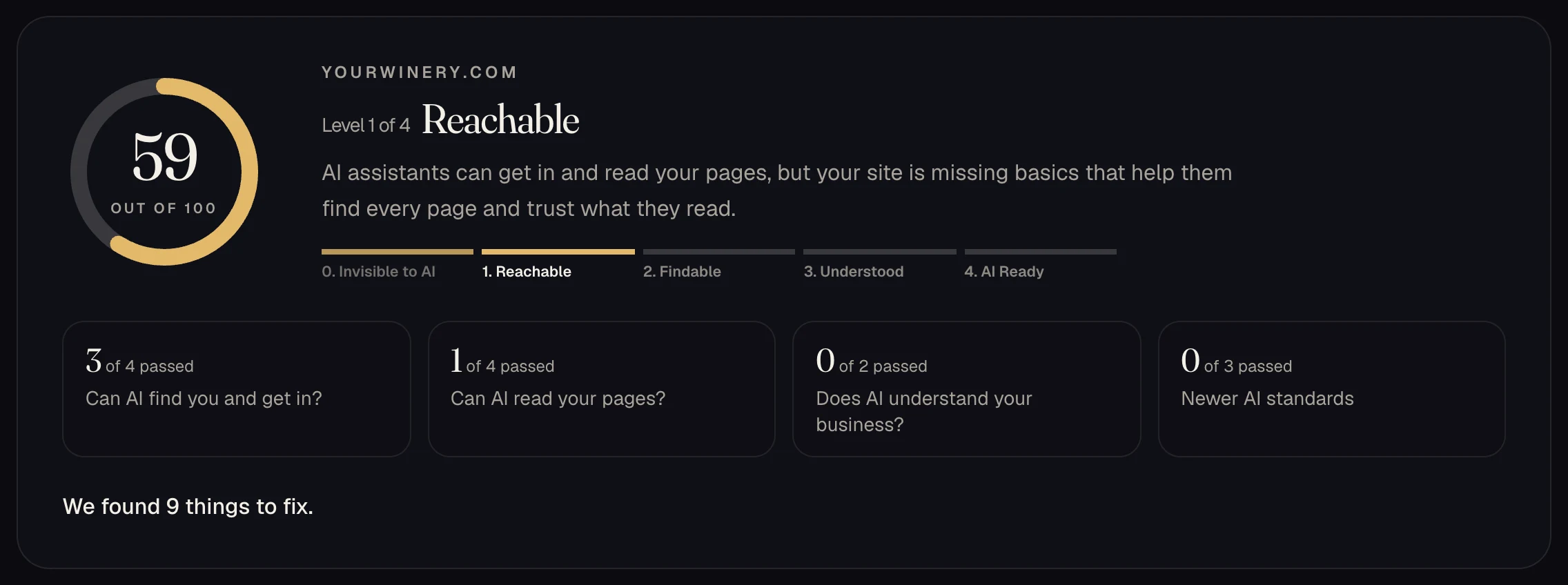
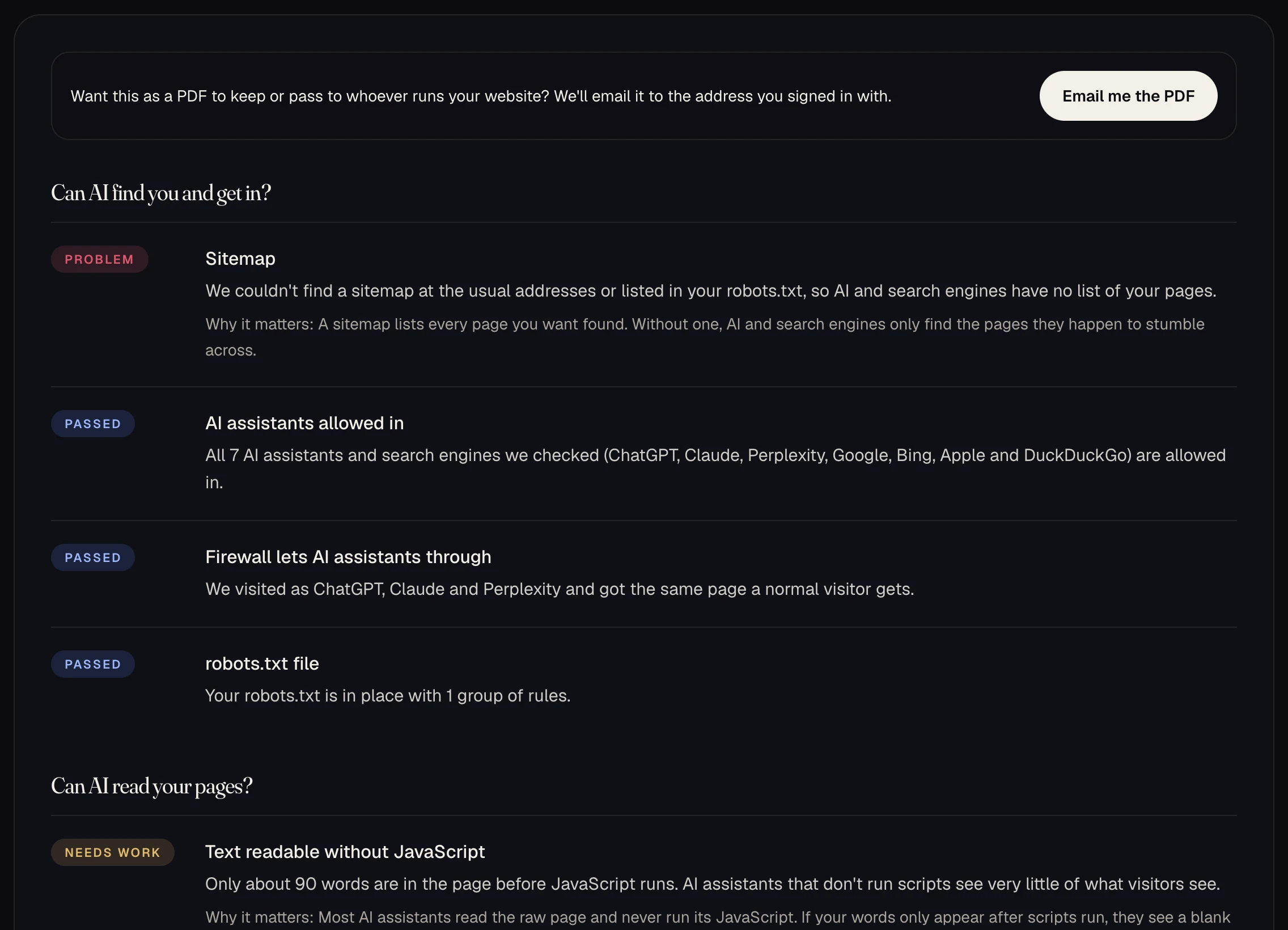
Here is the output, on made-up numbers.
See it before you sign in or type anything. The pictures below show a made-up report for yourwinery.com: a typical small winery site. Your own report looks the same with your results.
On your screen
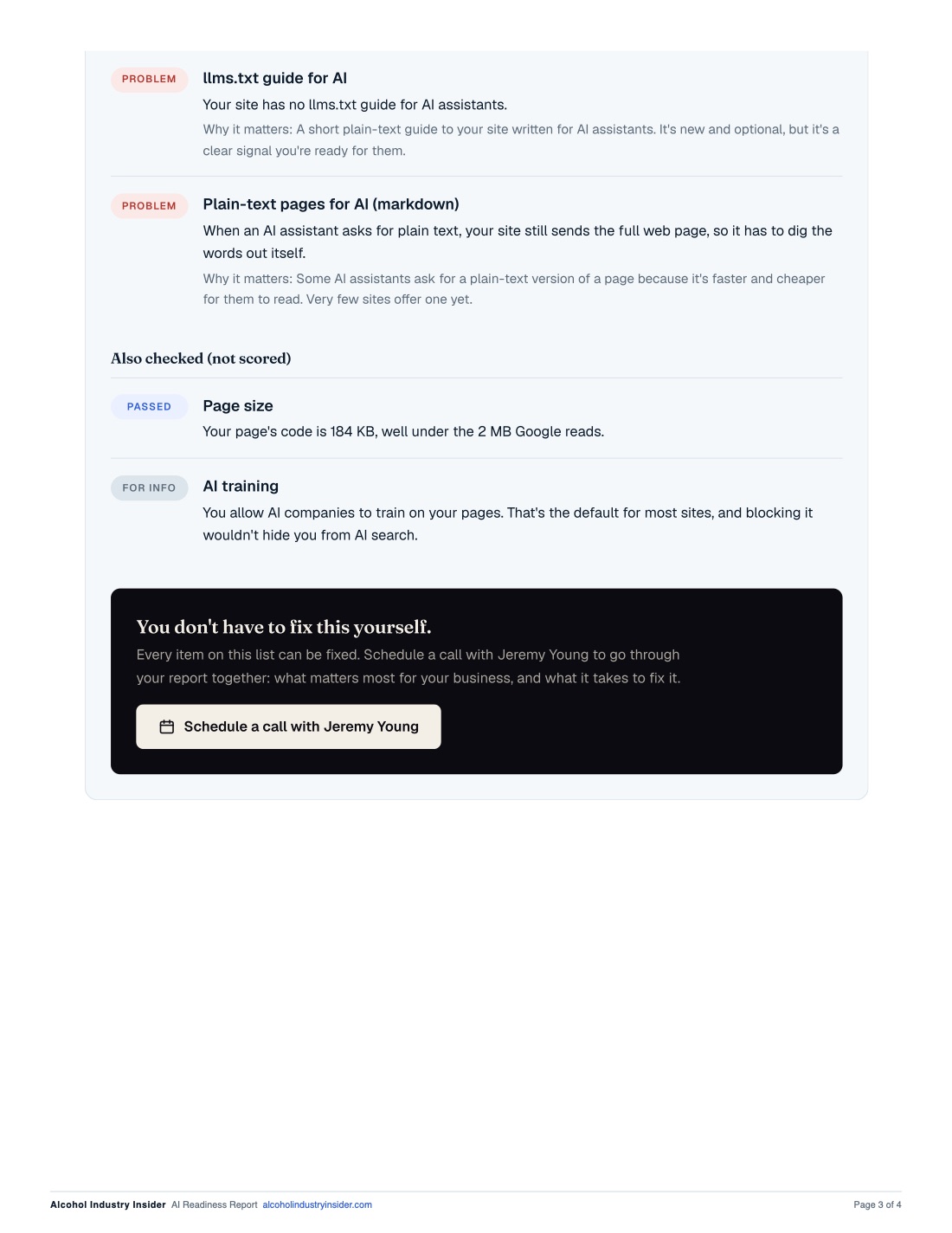
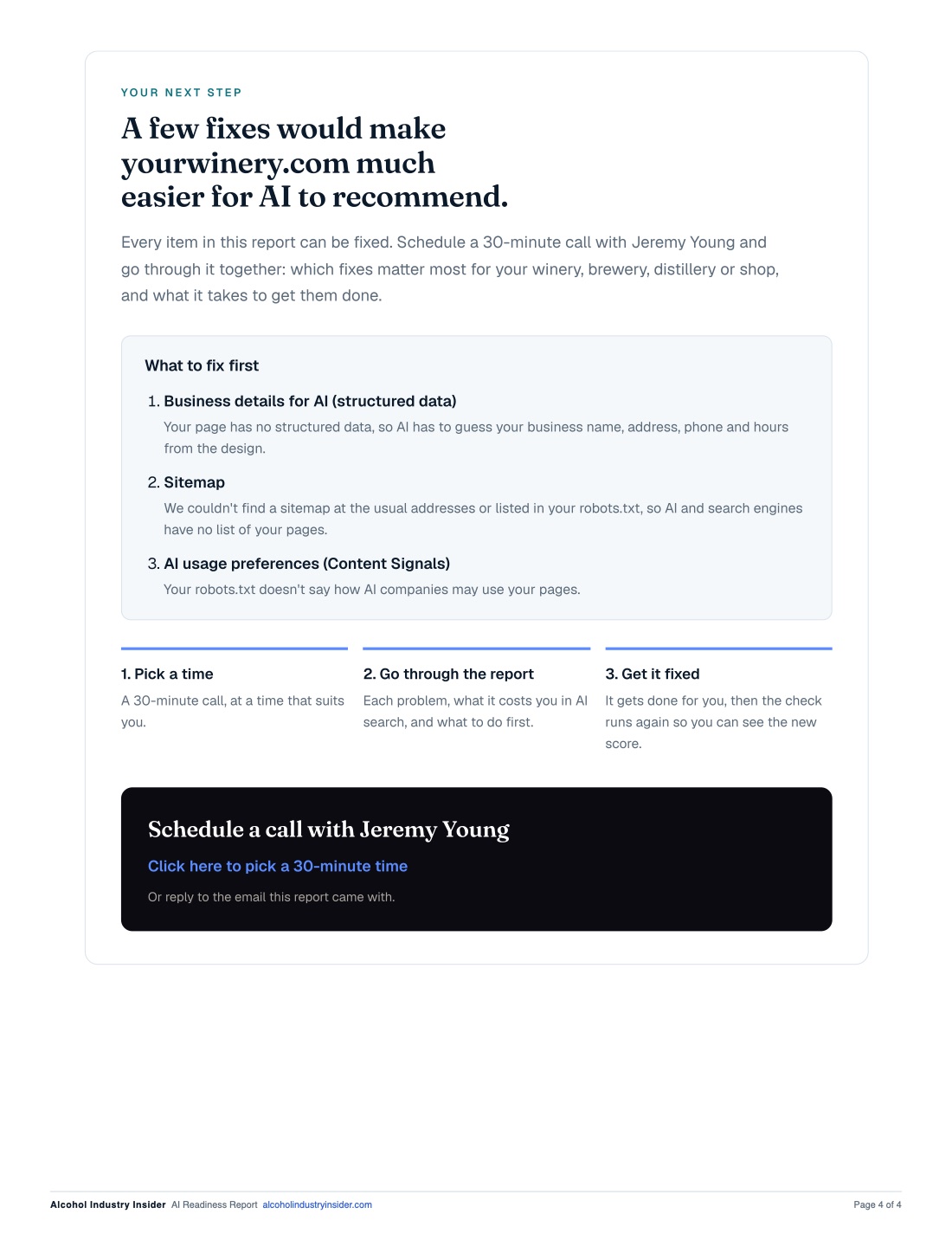
The PDF in your inbox
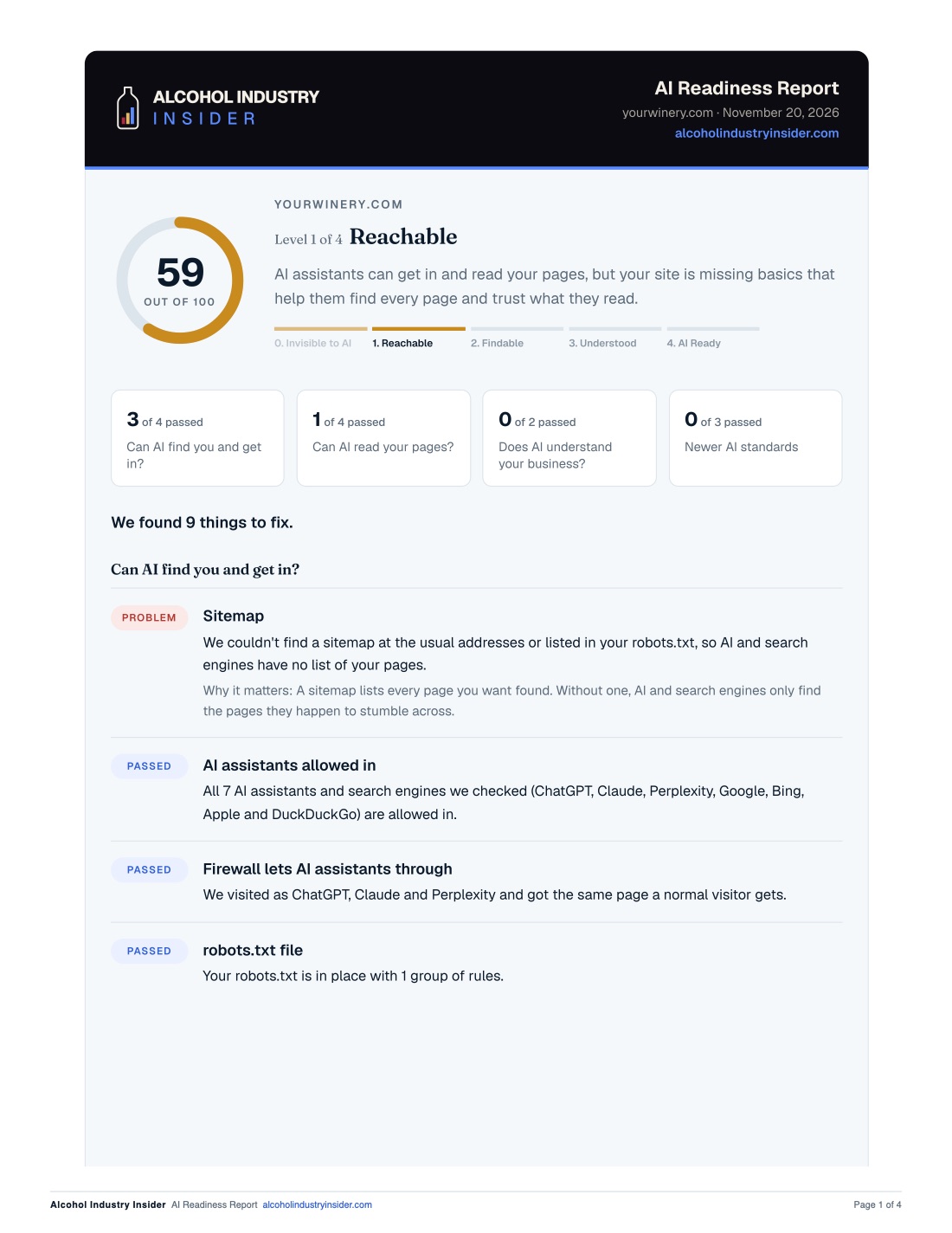
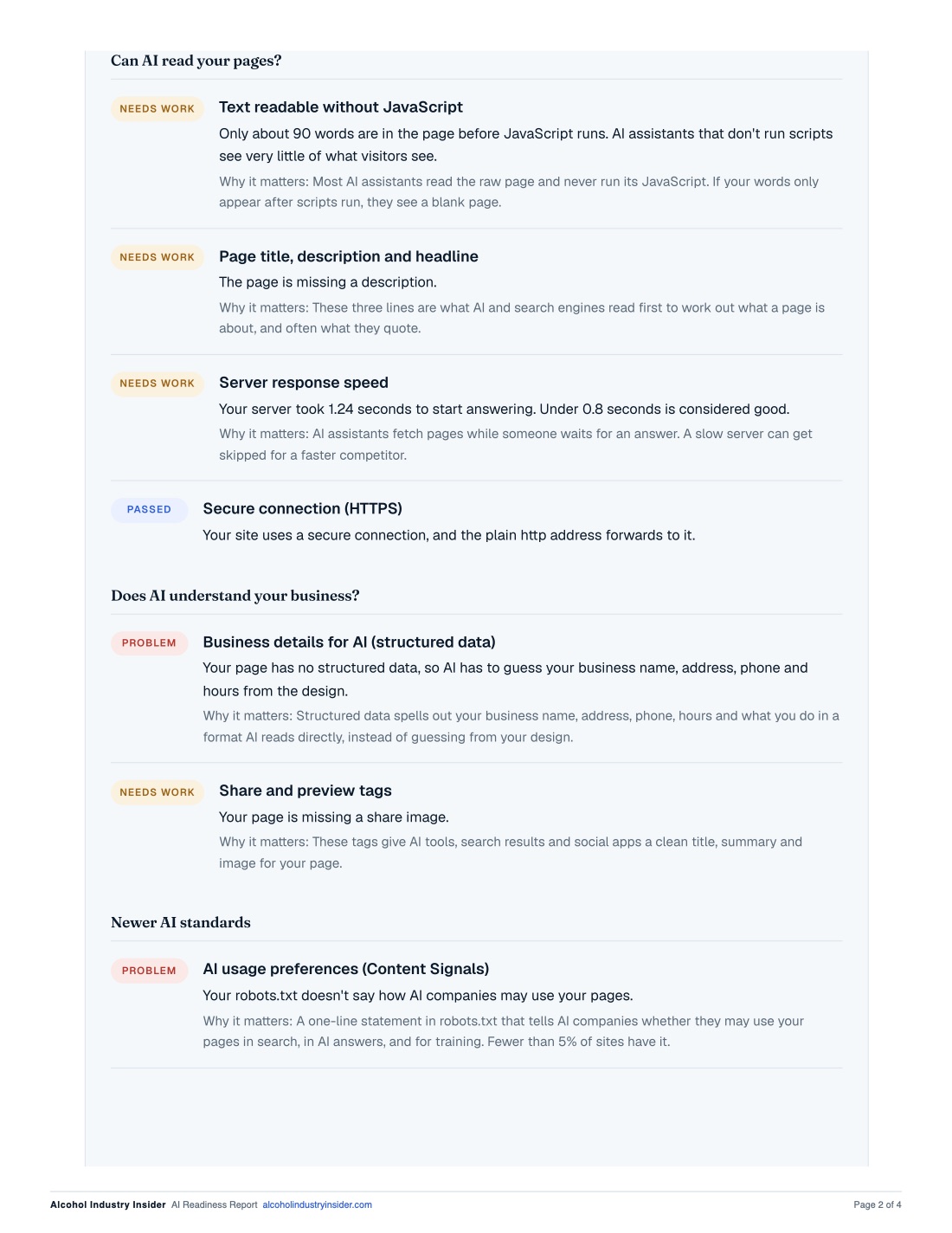
Press “Email me the PDF” and this arrives. The same report as a PDF in your inbox: the score, all 13 checks with what to fix, and how to book a call about it.
Step by step
How to use it
The pictures below show a made-up report for yourwinery.com: a typical small winery site. Your own report looks the same with your results.
Type in your website.
Sign in with your email, type just the address, like yourwinery.com, and press Check my site. It takes about ten seconds and reads only pages anyone can see.

Read your score and level.
A score out of 100, your level from Invisible to AI Ready, and how many checks passed in each group. The example scores 59 and lands on Reachable: AI can get in, but there's no sitemap and no business details written for AI.
Go through each check.
Problems come first. Every check says what we found on your site and why it matters for your business, in plain words. Press Email me the PDF for a copy to keep or pass to whoever runs your website. Your score is saved to your account, so you can check again later and compare.
Get help fixing it.
Every item can be fixed. Schedule a call with Jeremy Young to go through your report together and decide what to fix first.

What the 13 checks look at
The checker visits your site the way an AI assistant does: it asks for your homepage, your robots.txt, and your sitemap, then asks for the homepage again as ChatGPT, Claude, and Perplexity to see whether your firewall lets them in. Each check is worth points, and the ones that can keep AI out entirely are worth the most.
- Can AI find you and get in?
- Whether your robots.txt lets ChatGPT, Claude, Perplexity, Google, Bing, Apple, and DuckDuckGo in (15 points), whether your firewall lets them through when they actually show up (15), whether there's a proper robots.txt at all (5), and whether a sitemap lists your pages (8).
- Can AI read your pages?
- Whether your words are in the page itself or only appear after JavaScript runs, which most AI assistants never do (15), a secure https connection (7), a clear page title, description, and headline (7), and how fast your server answers (6).
- Does AI understand your business?
- Whether your page spells out your business name, address, and phone in structured data that AI reads directly (10), and whether it has a share title, description, and image (4).
- Newer AI standards
- A Content-Signal line saying how AI may use your pages (4), an llms.txt guide for AI assistants (2), and a plain-text version of your page for assistants that ask for one (2). Few sites have these yet, so they count for little.
How the score and the levels work
The score is the points you earn out of 100. A check that needs work earns half. The level matters more than the number, because it climbs in order. Level 0, Invisible to AI, means something is keeping assistants out: a robots.txt that blocks them, a firewall that turns them away, or a page that's blank without JavaScript. Level 1, Reachable, means they can get in and read. Level 2, Findable, adds a robots.txt, a sitemap with your pages in it, and https. Level 3, Understood, adds your business details in structured data. Level 4, AI Ready, adds the newer standards.
A high score won't on its own get you named in an AI answer. That comes from what you publish and what other sites say about you. What the score tells you is whether an assistant that wants to recommend you can actually read your site when it gets there.
The problems it finds most
We ran it on nine well-known winery, brewery, and distillery sites while building it. Only one spelled out its address and phone for AI, so for the other eight an assistant asked "which tasting rooms near me are open Sunday" has to guess. Two had firewalls that turned the scan away before it saw a word, and one told Perplexity to stay out in its robots.txt.
None of that shows when you look at your own site in a browser. Bot protection is often switched on by the website builder or the hosting company, and a site built as an app can look perfect to you while the page an assistant receives is nearly empty.
Your data, in plain words
This app works differently from the others here: instead of working on your own numbers or file, it visits a public website from our server. Here is exactly what that means, question by question.
- Why can't AI assistants read my website?
- Usually one of three things: a robots.txt that blocks them, a firewall that turns them away, or a page that's blank without JavaScript. None of it shows when you look at your own site in a browser, and bot protection is often switched on by the website builder or the hosting company.
- How do I check whether ChatGPT can see my website?
- Type in your address. The checker asks for your homepage, your robots.txt, and your sitemap, then asks for the homepage again as ChatGPT, Claude, and Perplexity to see whether your firewall lets them in. It takes about ten seconds.
- What is an AI readiness score?
- It's the points you earn out of 100 across 13 checks, plus a level from 0 (Invisible to AI) to 4 (AI Ready). The level matters more than the number, because it climbs in order and the problems that keep AI out entirely are worth the most.
- How do I get ChatGPT to recommend my winery?
- A high score won't do it on its own. That comes from what you publish and what other sites say about you. The score tells you whether an assistant that wants to recommend you can actually read your site when it gets there.
- What do I give the app?
- Your website address. You sign in with your email first, like every app here, and the full check-by-check report opens right on the page. Press Email me the PDF and a copy goes to the address you signed in with, and nowhere else.
- Why does your server do the checking?
- Browsers block one website from reading another company's website, for good reasons. So when you press Check, our server visits your site for you, the same way ChatGPT, Claude, or Perplexity would: it asks for your homepage, your robots.txt, your sitemap, and a couple of small files AI assistants look for, then runs the checks on what came back.
- Is my site or my result put into Claude or any other AI?
- No. The checks are a fixed list of rules, written out on this page, and they run as ordinary code. When we visit your site pretending to be ChatGPT or Claude, that's only to see whether your firewall lets them in. No AI model is involved.
- What's saved, and for how long?
- Your account keeps the address you checked, the score, the level, and how many checks passed in each group, so you can come back and compare. Not every check: press Check again on a saved score to see them as they stand today. It's kept for as long as you have the account. Delete it on your account page, or delete the account and it goes with everything else. The checker also holds a result in memory for ten minutes, so checking the same site again is instant, our logs keep the site's address and its score, and we add one to a daily count of checks. If you ask for the PDF, it goes to the email you signed in with, and Jeremy gets a copy of your report to follow up if you'd like help fixing it. Nothing is sold or used to train anything.
- Can it change anything on my site?
- No. It only reads. It asks for pages the same way a visitor's browser does and never sends a form, logs in, or touches anything that isn't public.
Questions this does not answer? Reply to any issue of the newsletter and ask. It goes straight to Jeremy.